
Start with product identity
Use the exact extension name, developer listing, Chrome Web Store URL, support page, and privacy page before installing. For this product, the extension name is WA - Download Group Phone Numbers and the Chrome Web Store listing uses the extension ID henhldbgljkagjabmpjnlphncpnfggcd.
Review the permission surface
A WhatsApp Web contact export extension needs access to WhatsApp Web to read visible page data. That does not mean every broad permission is equally acceptable. Review what the extension asks for, whether the permission matches the workflow, and whether the product explains how exported data is handled.
Prefer a review-first export workflow
A review-first workflow downloads available contacts into a workbook rather than pushing raw rows directly into campaigns. Teams should remove irrelevant rows, dedupe numbers, confirm source group context, and add consent or owner-review columns before CRM import or outreach.
Check support and privacy links
Do not treat a Chrome extension as business-ready if you cannot find support and privacy information. The support page should explain how to get help, and the privacy page should explain the data-handling position in plain language.
Avoid misleading claims
Be careful with tools that imply they can export hidden, deleted, private, or inaccessible WhatsApp data. A practical WhatsApp Web export workflow should stay limited to contacts and fields visible to the user account in the active WhatsApp Web session.
Match the export format to the next step
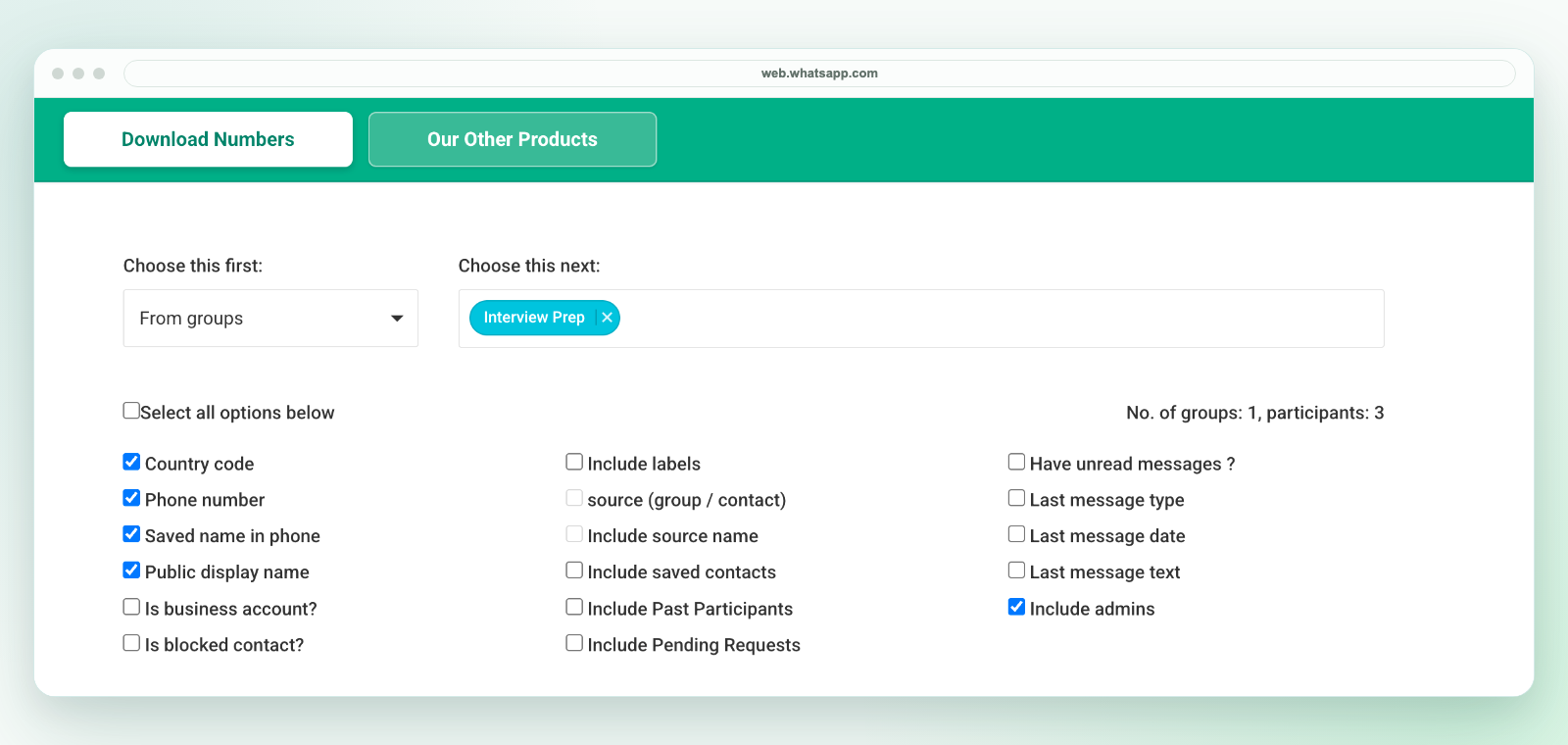
Excel and CSV are useful when the next step is cleanup, assignment, dedupe, or CRM preparation. Choose fields like phone number, country code, saved name, public display name, source group, label context, admin status, or last-message context only when those fields are required for review.
Check the actual download workflow
For WA - Download Group Phone Numbers, launch the extension from the Chrome toolbar in desktop WhatsApp Web. Select an authorized group and available fields, then download an Excel (.xlsx) workbook. Check a sample of rows before relying on the output.
This is not a direct CSV file. To hand off CSV, review the selected worksheet in Excel and use Save As to create a CSV UTF-8 copy. Preserve phone-number columns as text and test a small batch in the destination system.
A listing and checklist are not a security certification
A Store listing, positive reviews or a published privacy page do not by themselves prove that a tool meets your organization's security requirements. Review the current version and permissions with the responsible team. Do not disable browser security controls or bypass managed policies to make an export work.
Team checklist
- Confirm the exact Chrome Web Store listing and extension ID.
- Read the support, privacy, and terms pages before use.
- Install only from the official store listing.
- Export only visible WhatsApp Web contact data your account can access.
- Use spreadsheet review before CRM import, campaign handoff, or follow-up.
- Remove rows that do not belong in the workflow.
- Limit access to the downloaded workbook and any CSV copies.
When WA - Download Group Phone Numbers fits
WA - Download Group Phone Numbers fits teams that already work from WhatsApp Web groups and need a spreadsheet-ready way to review visible contacts, names, phone numbers, country-code context, source details, labels, and export fields before cleanup or handoff.
Related pages
See responsible WhatsApp contact export, WhatsApp contact export Chrome extension, WhatsApp contact export fields, and WhatsApp contact export alternatives.