
Comparison
WAExport vs WA - Download Group Phone Numbers.
Both export WhatsApp group members from WhatsApp Web. Compare formats, chat export, prices and Store figures, taken from each listing, before you install.
Which WAExport this page compares
Several Chrome Web Store items use the WAExport name. This page compares the listing titled “WA Chat Export - Download WA Number to Excel/CSV/VCard - WAExport”, ID ldodkdnfdpchaipnoklfnfmbbkdoocej (Store listing). As of November 11, 2026 it showed 80,000 users and a 4.9 rating from 7.3K ratings. Everything we say about it below comes from that listing, read on November 11, 2026. They are publisher claims, not our hands-on test. For a different chat-export listing that also uses the name, see our WAExport alternative page.
Feature comparison
| Feature | WAExport (its listing) | WA - Download Group Phone Numbers |
|---|---|---|
| Group members | One group, several groups or all available groups. | One group, several groups or All groups. |
| Admins and unsaved numbers | Include or exclude administrators, or focus on numbers not saved in your contacts. | Include admins option; Include saved contacts adds a yes/no column you can filter in Excel. |
| Other sources | All Contacts or Chat List, with business-status, calling-code and label filters. | Panel sources include From all contacts, From all open chats, From chats using labels, From groups using labels, From specific countries and From specific broadcasts. |
| File formats | Excel, CSV or VCard/VCF. | Excel (.xlsx) workbook only. CSV via Excel Save As; no vCard. |
| Chat history | Private or group chats by date range, saved as HTML, Excel or CSV; photos, videos and documents with its Max plan. | No chat-history or media export. Optional last-message columns are not an archive. |
| Free tier and price | Check its listing or site for current plans. | First 10 contacts free. $7.99/month, or a one-time $9.99 30-day pass or $25.99 6-month pass (no renewal). In India the passes can also be paid by UPI. |
| Store users and rating (as of Nov 11, 2026) | 80,000 users; 4.9 from 7.3K ratings. | 60,000 users; 4.5 from 350 ratings. |
Which one fits
- Pick WAExport if you need a vCard/VCF file for a phone address book, a direct CSV download, or an archive of chat messages and media. Its listing describes all three; ours does none of them.
- Pick WA - Download Group Phone Numbers if you want a focused Excel workbook of group members with admin, saved-contact and source-group columns, a free 10-contact test, and one-time passes that do not renew (also payable by UPI in India).
How our export works
- Open WhatsApp Web in desktop Chrome and launch WA - Download Group Phone Numbers from the Chrome toolbar.
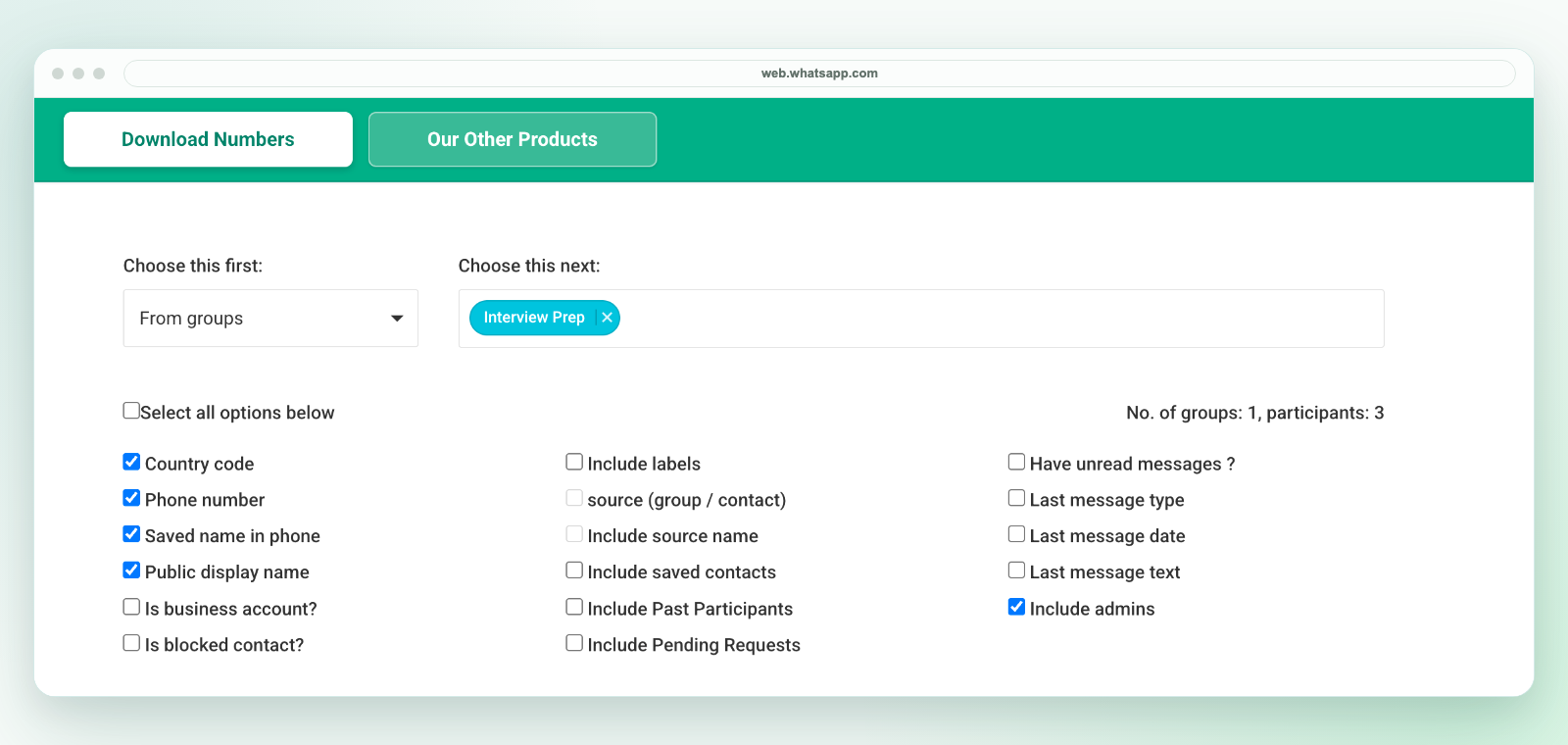
- Under Choose this first, pick From groups, then select one group, several groups or All groups.
- Tick the columns you need, such as Phone number, Country code, Saved name in phone, Public display name, Include source name, Include saved contacts and Include admins.
- Download an Excel (.xlsx) workbook. The first 10 contacts are free; full lists need a plan.
- Check a sample of rows and remove duplicates if you exported several groups. If your destination needs CSV, use Excel Save As to create a CSV UTF-8 copy and test a small batch before importing.
Limits to know before you install
- Visible members only. In community announcement groups WhatsApp hides most members' numbers, and no extension can reveal them (why a member's number isn't showing).
- Groups you belong to. You cannot export a group you have not joined. You do not need to be an admin.
- Excel only. The download is an Excel (.xlsx) workbook, not a direct CSV file, and there is no vCard output.
- Desktop Chrome and WhatsApp Web. It does not run inside the phone app, send messages or join groups.
Related pages
See download WhatsApp group numbers to Excel, group members to CSV via Excel, group contacts to Google Contacts and the WhatsApp contact export alternatives guide. Check our plans, privacy and support before paying. Export only contacts you are authorized to handle; a visible number is not marketing consent. WA - Download Group Phone Numbers is independent and is not affiliated with WhatsApp, Meta or the WAExport publisher.
FAQ
Is WA - Download Group Phone Numbers the same as WAExport?
No. They are separate extensions from different publishers. Our Store ID is henhldbgljkagjabmpjnlphncpnfggcd; the WAExport listing compared here is ldodkdnfdpchaipnoklfnfmbbkdoocej.
Can your extension export chat messages?
No. It exports group members and contact rows to an Excel (.xlsx) workbook. If you need a chat archive, WAExport’s listing describes HTML, Excel and CSV chat exports.
Can I get a CSV or VCF file?
Our download is an Excel (.xlsx) workbook. Save a CSV UTF-8 copy from Excel if you need CSV. There is no VCF output; WAExport’s listing says it offers VCard/VCF.